
Features
Everything Claire Mail does today, on the Mac and iPhone.
Gmail and Google Workspace, with more than one account.
Inbox categoriesSort with Claire (Primary, Other, Newsletter) or like Gmail (Primary, Updates, Promotions, Social, Forums). Moving a message in Gmail mode changes its Gmail category.
One row per conversationEvery person in the thread on one line, and the conversation moves up when someone replies.
Two actions per swipeA short and a long swipe in each direction. By default Trash, Archive, Snooze and Pin.
Pin and snoozePin with an optional due date. Snooze to a preset or a time you pick, and it comes back unread.
LabelsGmail labels as pills on each row, a page per label, and quick label changes.
SearchGmail search with filters for unread, attachments, from me, starred and dates.
WritingRich text, attachments, contact suggestions from all your Google contacts, and drafts saved to Gmail. Forwards keep the original's attachments.
A writing window on the MacNewNew messages, replies and forwards open in a window at the bottom right, so the email you are answering stays open behind it. Minimize it to a bar and come back later.
SignaturesNewOne signature for all accounts, or one per account. Use your formatted Gmail signature, and add it to replies too if you like.
Send mail asPick one of your verified Gmail addresses in From.
Undo Send and scheduled sendTake a message back for a few seconds, or schedule it for later.
Images blocked by defaultRemote images load only when you tap to show them.
Sender fontsKeep the fonts newsletters choose, or read everything in Claire's font.
Date headersNewToday, Yesterday and earlier sections, or one plain list.
Undo, then keep goingNewUndo waits beside the action bar while you move on. Choose what comes after an action: the next email or the list.
Jump to the latest messageNewIn a long conversation, one tap goes to the start of the latest message. On the Mac, another goes back to the top.
Triage
Go through mail and reminders one card at a time.
Mail TriageSkip, delete, pin, snooze, archive or reply to each email, with Undo. Swipes on iPhone, keys on the Mac.
Conversations in TriageNewWhen a conversation has more unread mail, open all of it from the card and come back to the same place. Read all clears the whole conversation.
Triage remindersThe reminders for the date you have selected, card by card: done, tomorrow, snooze, skip or delete, with Undo.
Change it on the cardTick subtasks and change the list or priority without leaving Triage.
Ask Claire in TriageOn any email or reminder, from the bar or the rail.
Today
Your mail, schedule and reminders on one page.
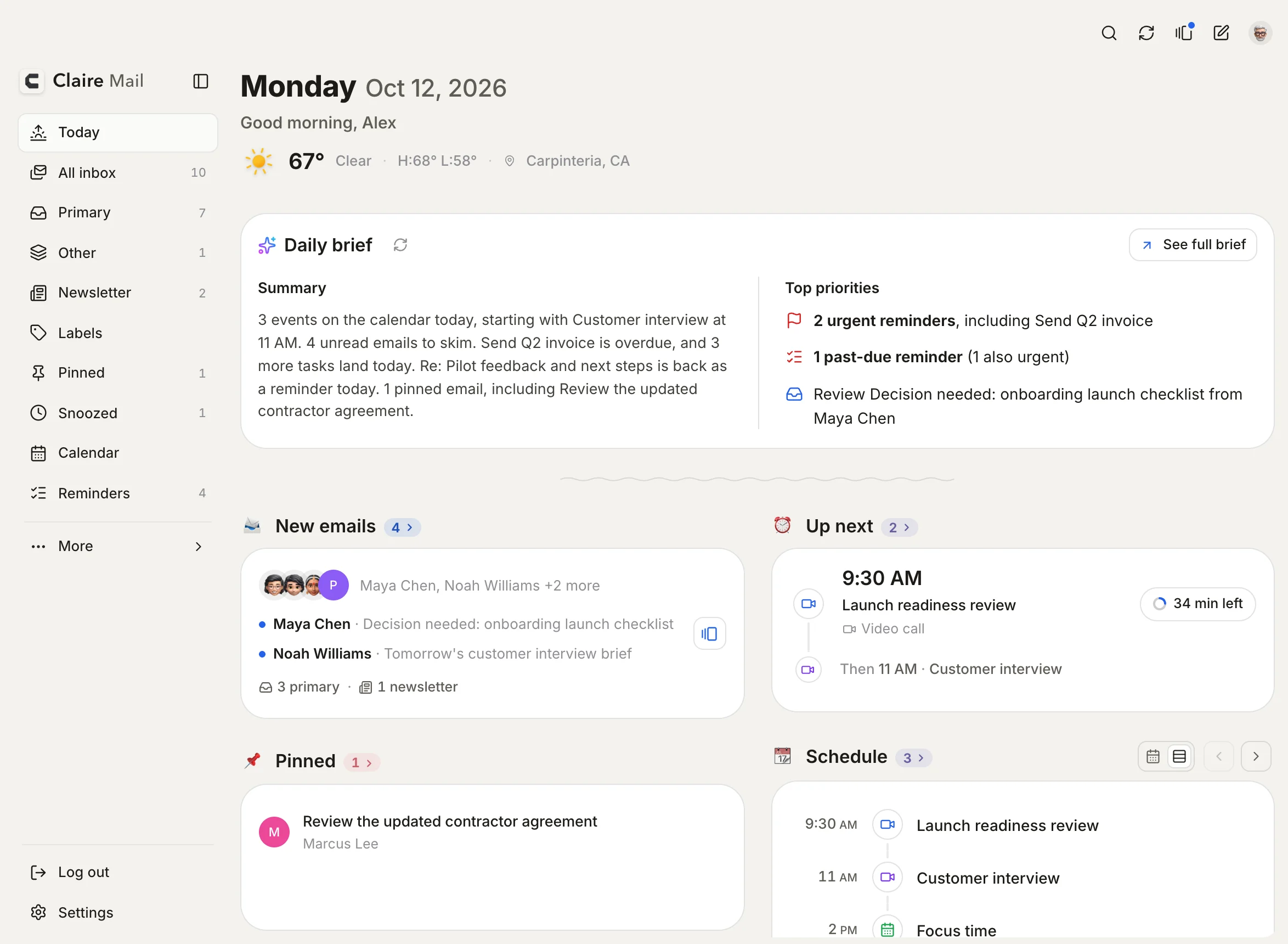
Daily briefA short summary of your day with the top priorities first. Mark one Not needed and it stays gone. Optional.
What you missediPhoneA stack of cards for new mail, swiped one by one.
Up nextYour next meeting with a Prepare button that pulls in the related mail.
Schedule, pinned and remindersToday's events, pinned mail, snoozed mail and reminders due today, each as a section you can turn off.
WeatherToday's forecast for where you are.
WidgetsiPhoneNew emails, Up next, Schedule, Daily brief, Due today and Weather on the Home Screen.
Ask Claire
Help with one email or reminder, when you ask for it.
Key pointsThe few things that matter in a thread.
Next stepsReply, snooze, pin, archive, delete or remind me, each a tap away. Nothing runs on its own.
Reply draftsA draft in your voice, opened in the composer for you to edit and send.
Times that fit your calendarWhen someone offers meeting times, only the ones you are free for are shown.
Help with a reminderKey points from related mail, then add subtasks, draft the email, suggest a due date or write the notes.
Your AI, your choiceOff until you set it up. Apple Intelligence on the device, or your own key for Claude, OpenAI, Gemini, Grok or Groq. One switch per feature.
Calendar
Google Calendar and Apple Calendar, read only.
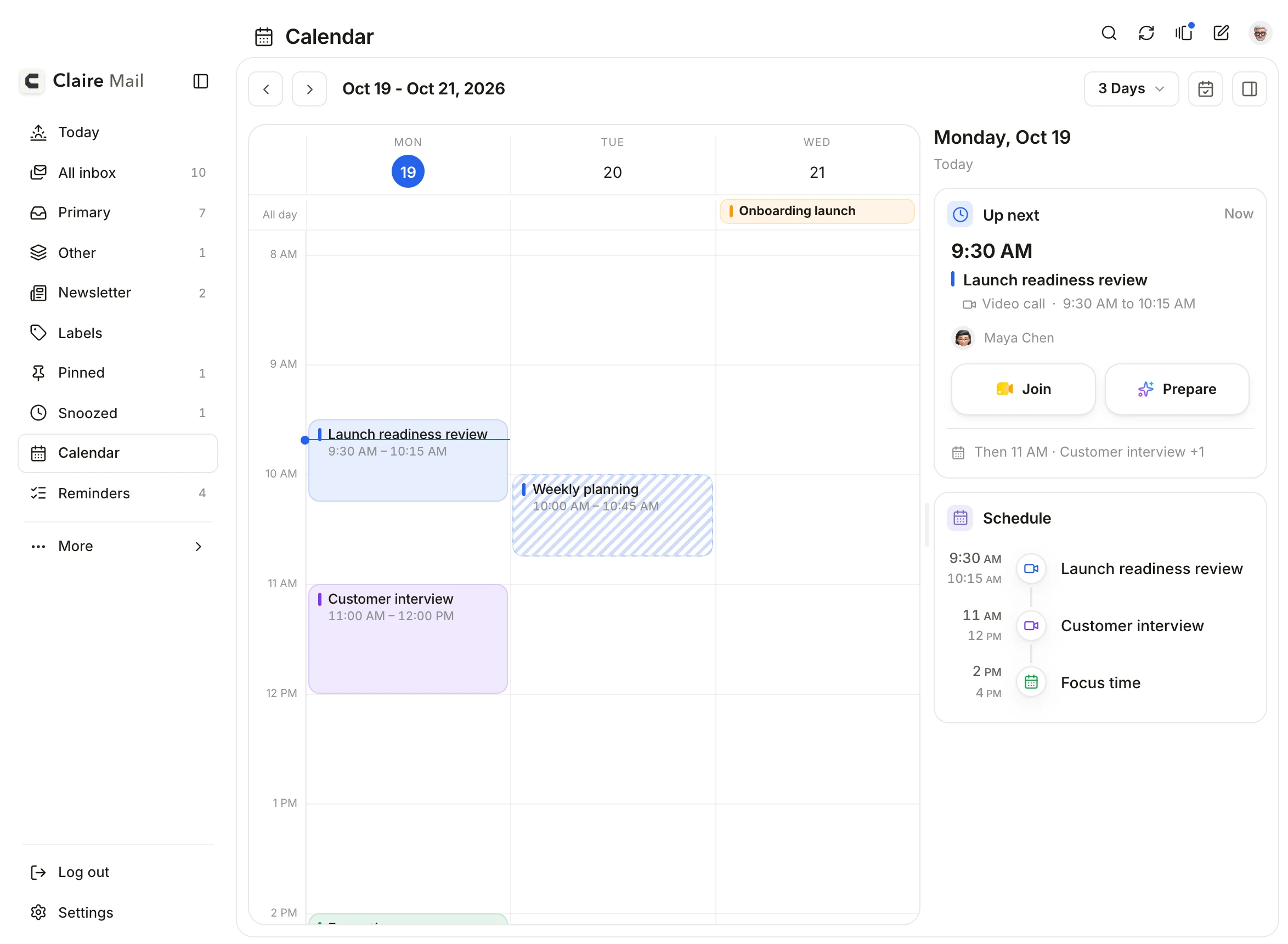
ViewsDay, several days, work week, week and month on the Mac; a day view with a week strip on iPhone.
Event detailsAttendees, location with a map, and the meeting link to join.
Apple CalendarEvery calendar on your Mac or iPhone, iCloud included.
More than one calendarChoose which calendars show, with their colours.
Reminders
Your Apple Reminders, in the same app as your mail.
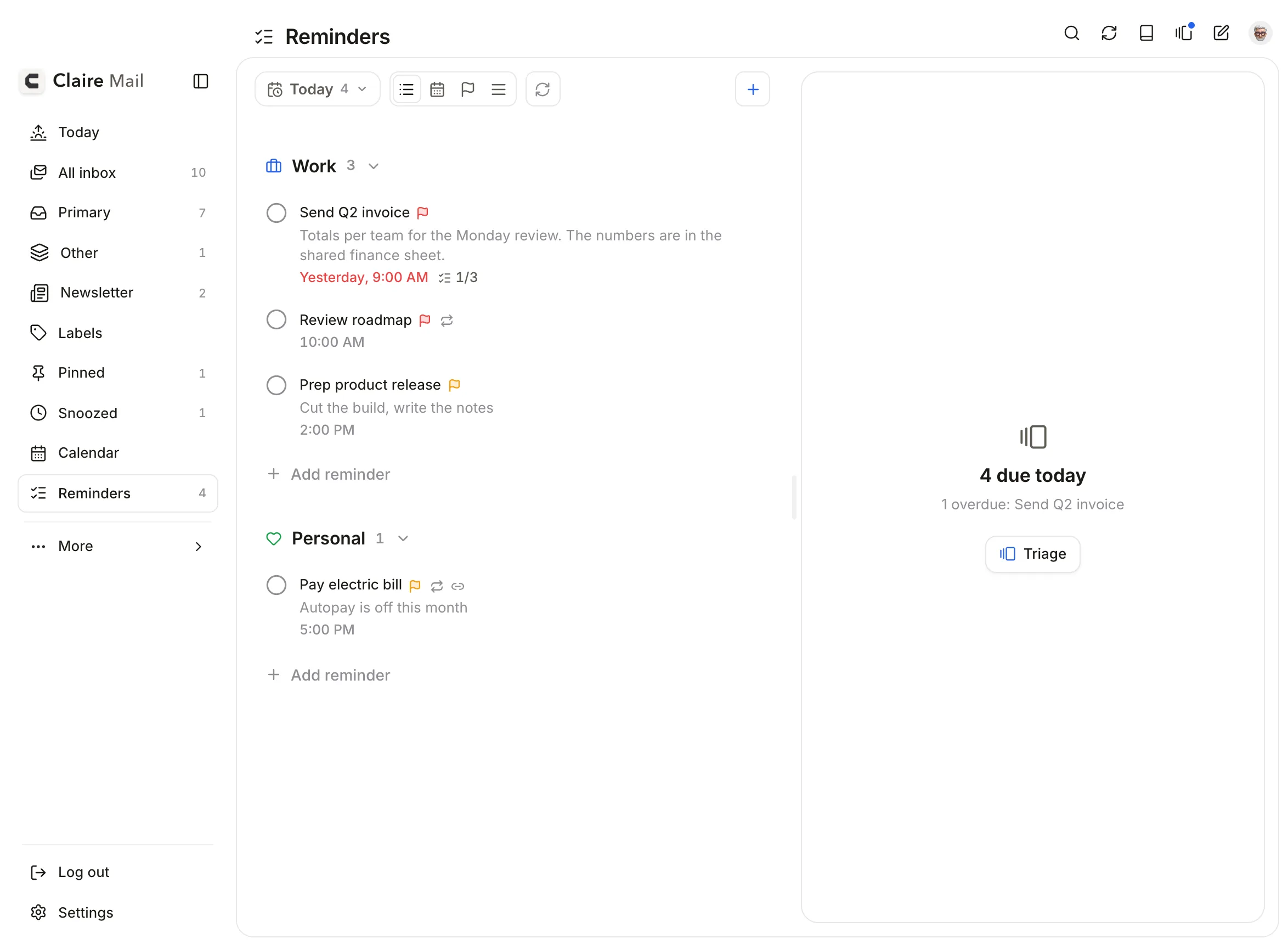
Everything Reminders doesCreate, edit, complete and delete. Due dates and times, priority, lists, repeats and subtasks.
Add reminder from an emailNewPick a time or no date and a list. The reminder opens the email again, from Claire or the Reminders app.
Triage remindersStart from the Reminders page, from Today, or from the Brief when reminders are due.
Add one, then the nextMacCommand-Return in New reminder adds it and starts another.
Quick addMacPress Control Option R in any app to add a reminder. Type #work for the list and !! for the priority.
Remind me from an emailAsk Claire adds a reminder that opens the email again.
Filters and groupingToday, Tomorrow, All open or Completed, grouped by list, date or priority.
Mac and iPhone
Built for both, with the same features on each.
Ask SiriAsk about your next meeting, new emails, what’s due or the weather, or add a reminder, with Claire closed. Also in the Shortcuts app. iPhone.
Default mail appSet Claire as the mail app links open in, on the Mac and on iPhone.
Links stay in ClaireiPhoneWeb links in emails open inside the app, with Done to come back.
Mac appMacFor Intel and Apple silicon, with automatic updates.
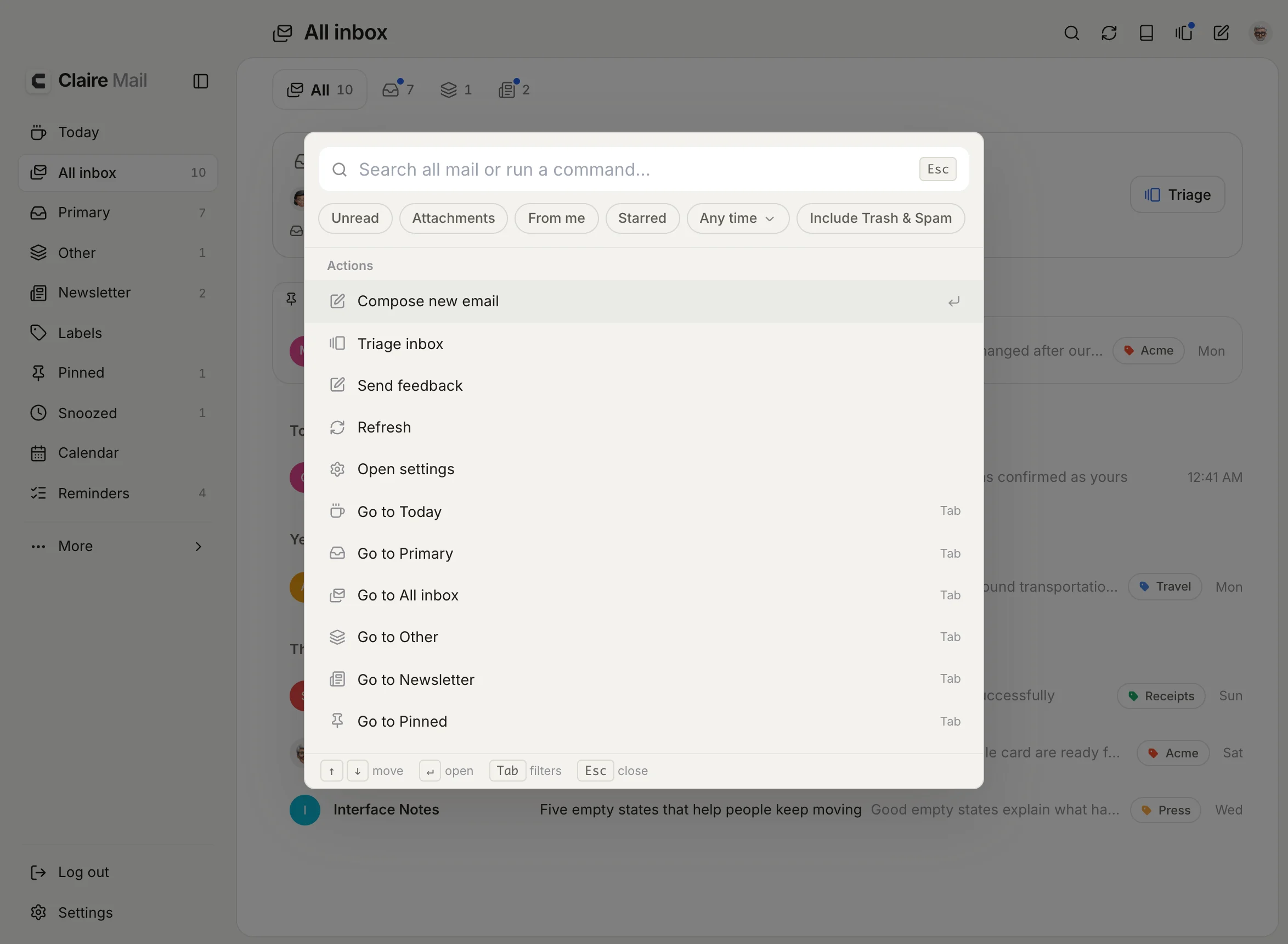
Command paletteMacPress ⌘K to search all your mail or run a command: write an email, start Triage, open any folder, or archive, snooze, pin and label the email you are reading.
Keyboard firstMacShortcuts for every action, and a reading pane.
iPhone appiPhoneNative gestures, sheets, haptics and notifications.
FrameNewA white page on a black base, on the Mac and on iPhone, and a dark version for dark mode. Settings, Appearance.
LooksLight, dark or system. Solid, White and Black, Frame on the Mac and iPhone, and Frost on the Mac.
Photos from ContactsNewSender photos from your contacts, when you allow access. Mac and iPhone.
New-mail notificationsNewOn the Mac, banners within seconds, even when Claire is minimized or closed to the Dock. On iPhone, Primary only stays quiet for promotions.
TranslateNewTranslate an email on iPhone with Apple’s on-device translation. No AI. iOS 17.4 or later.
Week starts onNewSunday, Monday or your region, for every calendar. Settings, Appearance.
SyncChanges made on one device show on the others when they open.
Privacy
What happens to your mail.
Your mail stays in GmailLabels, archive and snoozes are saved in Gmail.
AI is optionalOff until you set it up. Apple Intelligence runs on your device. With your own key, requests go straight to that provider.
Ask Claire historyKept on your device, encrypted.
Images blocked by defaultRemote images load when you tap to show them.
See what changed in each version on the releases page.